The Trading Partners list allows you to select a specific Trading Partner. Only documents related to the selected Trading Partner will be displayed in the Workbench folder selected. Also, if you create a new document, such as an Invoice, the document will be created for the Trading Partner that you have selected.
Depending on how many Trading Partners you are connected to, the Trading Partners list will display in one of two ways:
- If you have one (1) connected Trading Partner, that company is automatically selected when you open Workbench.
- If you have at least two (2), and up to 100 connected Trading Partners, all your Trading Partners are displayed under All. For more information, refer to To select a company from the Trading Partners list:, page 1.
All is automatically selected when you open Workbench and documents related to all of your Trading Partners will be displayed in the Inbox. The number of connected Trading Partners you have is displayed in brackets.
- If you have more than 100 connected Trading Partners, a search box drop-down is displayed under All. For more information, refer to To search for a company from the Trading Partners list:, page 1.
All is automatically selected when you open Workbench and documents related to all of your Trading Partners will be displayed in the Inbox. The number of connected Trading Partners you have is displayed in brackets.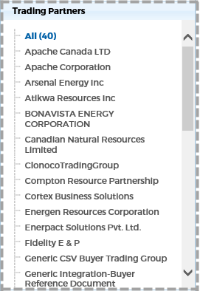
To select a company from the Trading Partners list:
If you have up to 100 Trading Partners:
- Scroll to the company in the Trading Partners list that you want to filter by.
- Click on the name of the company required. The document folder will display documents related to the selected Trading Partner.
To search for a company from the Trading Partners list:
If you have more than 100 Trading Partners, you will need to search for a specific company:
- Select the document folder you want to work in. For details, refer to either The Workbench Invoices Folder, page 1, or The Workbench Field Tickets Folder, page 1.
- Click into the Trading Partners list area and search for the company you want to select.
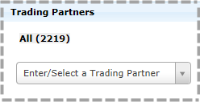
Search results will begin to display after you enter 2 or more characters. Results are returned only for connected Trading Partners whose names begin with the characters entered. - Click the name of the company you want to select from the displayed results.
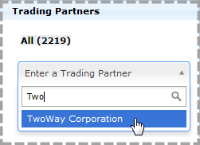
The document folder will display documents related to the selected Trading Partner and the selected company name will be listed under All. You can select between the current company and all companies until a new company is selected using the search box.